

At AgilityFeat, we look for engineers who solve real production problems, whether they’re part of a staff augmentation team or our internal nearshore team. This post shows how one engineer confronted the confusing behavior of npm lifecycle scripts and turned it into a deep, systematic exploration of npm’s internal workflows. It’s a good example of the kind of curiosity and rigor we value across our teams!
The Problem: npm Scripts That Don’t Mean What You Think
If you’ve worked with npm long enough, you’ve probably had this discussion:
- Should we use
prepare? - Or
prepublishOnly? - Is
prepublishdeprecated or still relevant? - Why is
preparerunning duringnpm install?! - Why does something work locally but break in CI?
I’ve had this exact debate multiple times with teammates. And every time, we ended up in the same place: the npm documentation is technically correct, but not cognitively clear.
The issue is not that the docs are wrong. It’s that:
- The lifecycle is described linearly, per command (that’s ok, it’s documentation of a CLI tool after all, so it makes sense to structure it like a man page).
- But in reality, npm lifecycle scripts behave like a graph of shared, reusable flows.
- Some scripts are contextual…
- …and others are reactive.
- And some (looking at you,
prepare) are everywhere, and have different surrounding scripts depending on the context they are running or the way they are invoked.
This makes it very easy to misunderstand what runs, when, and why.
The Goal
We wanted to answer a simple question: which script should we use, and what actually runs under each npm command?
But instead of stopping at an answer, we went further:
- Looked in the npm documentation for common patterns between the different workflows in the npm lifecycle scripts, and modeled them as a graph.
- Sought to understand how flows are shared and reused.
- Captured uncommon edge cases like:
npm publish --dry-run, git dependencies (npm rebuild,npm install <folder>), global installs (currently an anti‑pattern, but still worth understanding), and reactive hooks likedependencies.
The Result: A Complete npm Lifecycle Graph
Below is the final diagram.
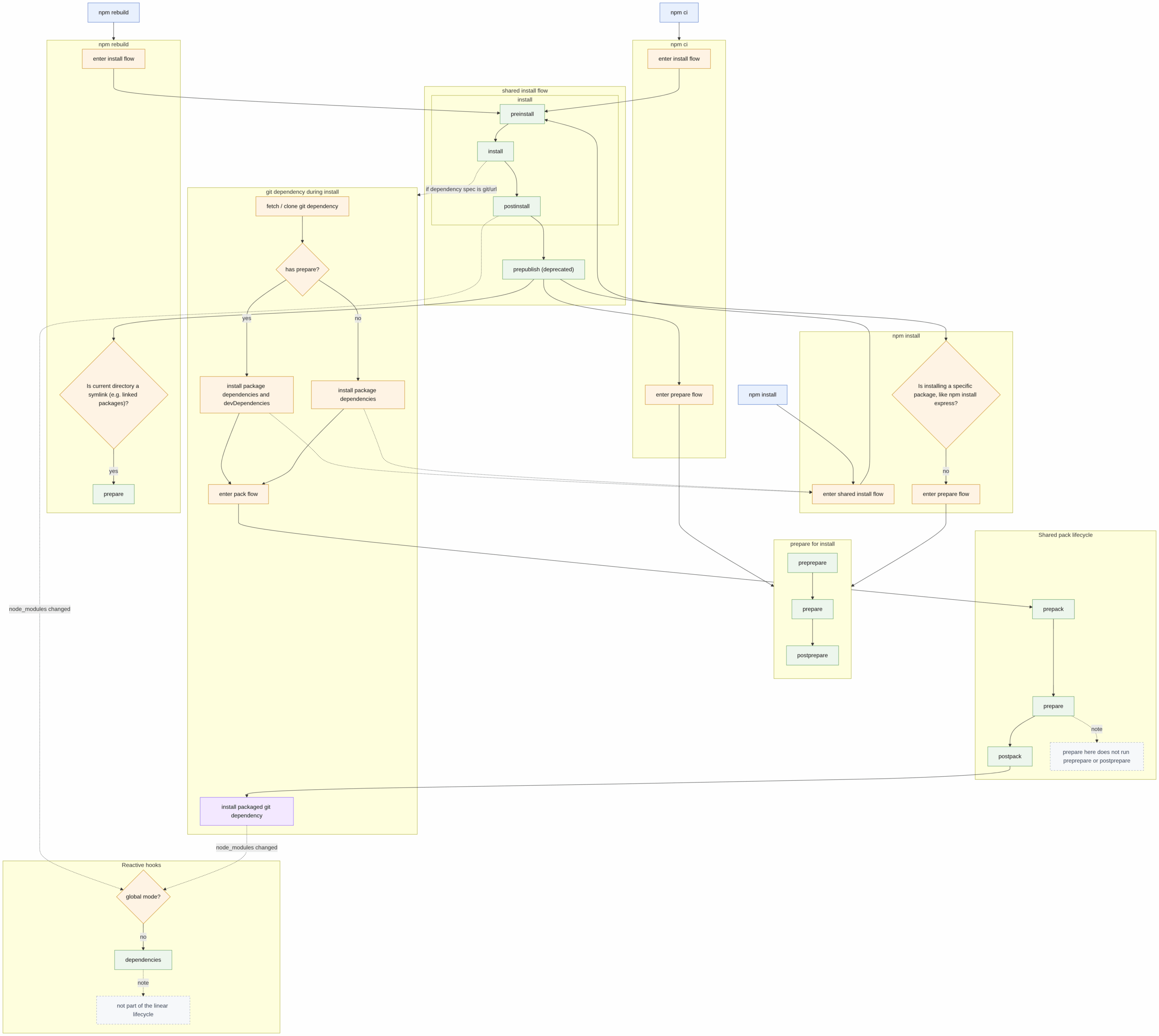
Mermaid diagram showing the different npm main flows and their relationship and callbacks.
This is not just a list of scripts, it’s a system model of how npm actually works.
Key Insight: npm Scripts are Not a Sequence. They are a Graph.
The most important realization is this: npm lifecycle scripts are not independent pipelines, they are composed flows.
Some examples:
- npm publish includes the pack flow.
- git dependencies reuse the pack flow internally.
prepareappears in multiple contexts, but not always with the same surrounding scripts (sometimes withpreprepareandpostprepare, others withprepackandpostpack, and sometimes alone).dependenciesis not part of any flow; it’s a reactive hook dispatched after changes to thenode_modules folder.
Breaking Down the npm Flows
- Install Flow (npm install / npm ci / npm rebuild). This is the most overloaded part of npm: it handles everything from fetching packages to running lifecycle scripts that need to execute when modules land in
node_modules. The install flow is whereprepareand reactive hooks can surprise you, because install is used in many contexts (local dev, CI, package linking, git dependencies), and npm reuses the same flows across those contexts. - Pack Flow (npm pack). The pack flow gathers package files, runs
prepack/postpackhooks, and prepares the tarball that will be published or used as an install artifact. Because pack is reused by publish and by git‑based installs, build steps here must be deterministic and environment‑agnostic. - Publish Flow (npm publish). Publish composes the pack flow and adds
prepublishOnlyhooks where appropriate. Understanding that publish delegates to pack explains why certain scripts run during publish even when they appear to belong to a different lifecycle. - Other Lifecycle Commands. There are many commands with their own specialized flows or that interact with the main flows in non‑obvious ways (for example,
npm rebuild,npm install <folder>ornpm publish --dry-run). These are worth modeling explicitly if you need complete certainty about what runs when.
So… Which npm Script Should You Use?
❌ Avoid
prepublish. It’s deprecated, misleading, and runs on install, not publish.
⚠️ Be careful with
prepare. It’s often the right tool, but it runs in many contexts it is easy to misuse and can break installs unexpectedly.
✅ Prefer
prepack. Use for build steps that must run when creating a tarball. It is consistent and predictable.prepublishOnly. Use for validation steps that should run only during publishing.
If you remember only one thing, make it this: prepublishOnly validates, prepack builds, and prepare leaks everywhere. But probably prepare is the one you want!
Interested in working with curious and competent nearshore software developers like Jesus? Check out AgilityFeat for:
- Staff augmentation. Add experienced engineers to your existing team for short‑ or long‑term projects.
- Builder Pods. Small, senior nearshore teams that move quickly. Reserve a dedicated pod for a product launch, skunkworks project, or proof of concept.
- Full product development. Turnkey engagements from our in‑house nearshore team. Experts in AI integration!