
You’ve built an MVP. The code works locally. Now comes the part that makes most startup engineers stare at their terminal like it owes them money: getting your ECS Fargate deployment running in production without spending three weeks on infrastructure or leaving the front door wide open to unauthorized access.
This guide walks through deploying a real multi-service FastAPI and Next.js application on AWS ECS Fargate. Terraform manages the infrastructure, GitHub Actions handles CI/CD, and automatic rollback is baked in.
If you’re a startup CTO, a solo developer shipping your first production workload, or a small team that wants to stop deploying from a laptop, this is for you.
What We’re Building
The goal is running multiple services (API, worker, and frontend) on a single ECS Fargate cluster, behind a single load balancer, without managing a single EC2 instance.
Here’s the high-level architecture:
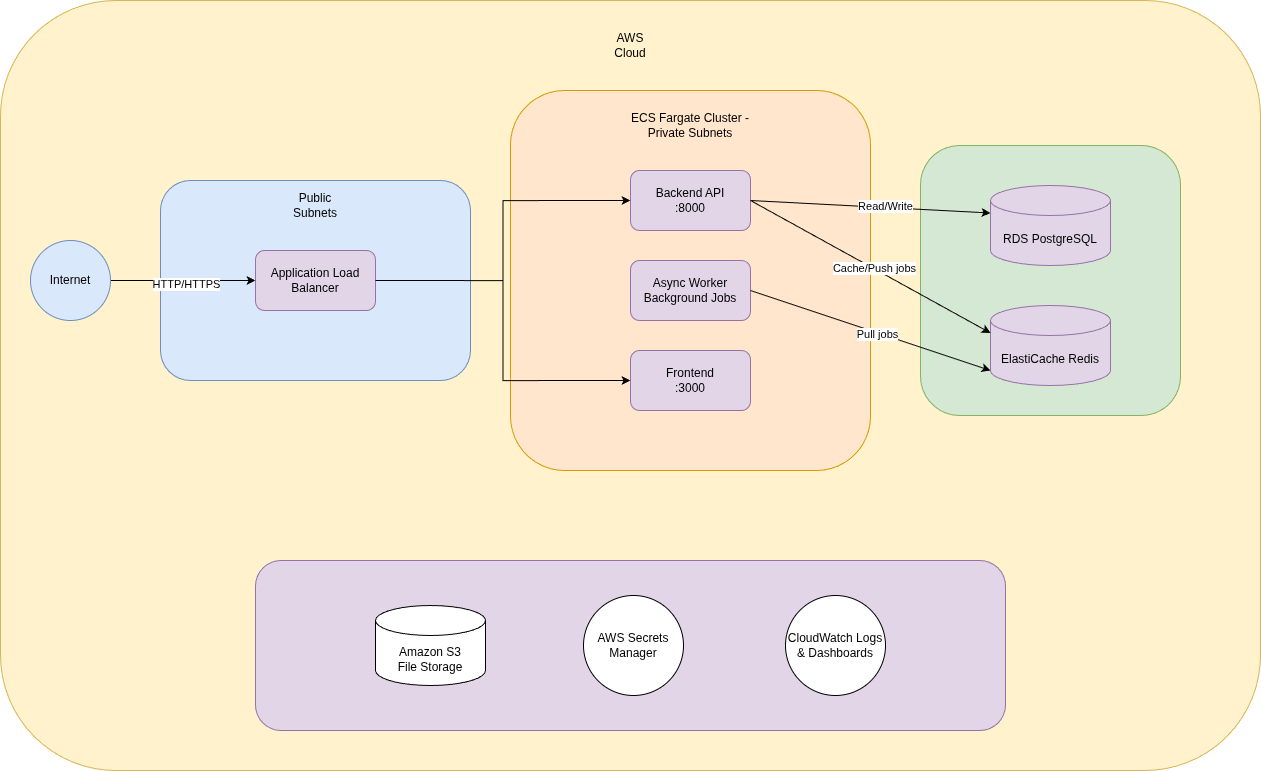
Three ECS Fargate services behind a single Application Load Balancer, in private subnets with RDS PostgreSQL, ElastiCache Redis, and no EC2 instances to manage.
Three services running on a single ECS Fargate cluster:
- Backend API — FastAPI on port 8000, handling all business logic
- Async Worker — Background job processor for long-running tasks
- Frontend — Next.js on port 3000, serving the user interface
Supporting infrastructure:
- RDS PostgreSQL 16.9 — Primary data store
- Amazon ElastiCache Redis 7 — Caching and job queues
- Amazon S3 — Cloud file storage
- AWS Secrets Manager — All credentials and API keys
- CloudWatch — Logs and dashboards
A single Application Load Balancer (ALB) handles routing with host-based rules: api.example.com goes to the backend, app.example.com goes to the frontend. One ALB, multiple services, one bill.
Why Fargate Over EC2
Fargate removes the need to manage EC2 instances entirely. No patching, no capacity planning, no SSH access to worry about. You define CPU and memory for each task, and AWS handles the rest. For an MVP, this means less operational overhead and a pay-per-use model that can scale down to zero when traffic is low.
Think of it as the difference between owning a car and calling a ride. You just need to get there.
Infrastructure as Code: The Terraform Stack
Everything lives in Terraform. Every subnet, every security group, every IAM role. If it’s not in code, it doesn’t exist.
Networking: VPC, Subnets, and Routing
The foundation is a VPC with a /16 CIDR block, split into public and private subnets across two availability zones:
resource "aws_vpc" "main" {
  cidr_block           = var.vpc_cidr
  enable_dns_hostnames = true
  enable_dns_support   = true
  tags = { Name = "${var.project}-${var.environment}-vpc" }
}

resource "aws_subnet" "public" {
  count                   = 2
  vpc_id                  = aws_vpc.main.id
  cidr_block              = cidrsubnet(var.vpc_cidr, 8, count.index)
  availability_zone       = data.aws_availability_zones.available.names[count.index]
  map_public_ip_on_launch = true
  tags = { Name = "${var.project}-${var.environment}-public-${count.index + 1}" }
}

resource "aws_subnet" "private" {
  count             = 2
  vpc_id            = aws_vpc.main.id
  cidr_block        = cidrsubnet(var.vpc_cidr, 8, count.index + 10)
  availability_zone = data.aws_availability_zones.available.names[count.index]
  tags = { Name = "${var.project}-${var.environment}-private-${count.index + 1}" }
}
The layout:
- 2 public subnets — Host the ALB and NAT gateway. These face the internet.
- 2 private subnets — Host ECS tasks, RDS, and Redis. No direct internet access.
- Internet Gateway — Routes public subnet traffic to the internet.
- Single NAT Gateway — Gives private subnets outbound access (for pulling images, calling external APIs). One NAT instead of one-per-AZ saves about $33/month. It’s a calculated tradeoff: if that AZ goes down, egress from private subnets stops. For an MVP in the initial phases, that’s acceptable.
resource "aws_nat_gateway" "main" {
  allocation_id = aws_eip.nat.id
  subnet_id     = aws_subnet.public[0].id
  tags = { Name = "${var.project}-${var.environment}-nat" }
}

resource "aws_route_table" "private" {
  vpc_id = aws_vpc.main.id
  route {
    cidr_block     = "0.0.0.0/0"
    nat_gateway_id = aws_nat_gateway.main.id
  }
  tags = { Name = "${var.project}-${var.environment}-private-rt" }
}
Alternatively, if the required internet access is only to access AWS Services APIs, a better solution is to use specific services VPC endpoints instead of a NAT Gateway.
Container Orchestration: Deploying FastAPI to ECR + ECS Fargate
ECR repositories store Docker images with vulnerability scanning enabled on push and lifecycle policies that keep only the last 10 tagged images:
resource "aws_ecr_repository" "app" {
  name                 = "${var.project}-backend"
  image_tag_mutability = "MUTABLE"

  image_scanning_configuration {
    scan_on_push = true
  }
}

resource "aws_ecr_lifecycle_policy" "app" {
  repository = aws_ecr_repository.app.name

  policy = jsonencode({
    rules = [{
      rulePriority = 1
      description  = "Keep last 10 images"
      selection = {
        tagStatus     = "tagged"
        tagPrefixList = ["v"]
        countType     = "imageCountMoreThan"
        countNumber   = 10
      }
      action = { type = "expire" }
    }]
  })
}
A single ECS cluster hosts all services. Each service gets its own task definition with minimal resource allocation — 256 CPU units and 512 MB of memory:
resource "aws_ecs_cluster" "main" {
  name = "${var.project}-${var.environment}-cluster"

  setting {
    name  = "containerInsights"
    value = "disabled"  # Enable for production
  }
}

resource "aws_ecs_task_definition" "app" {
  family                   = "${var.project}-backend-service"
  network_mode             = "awsvpc"
  requires_compatibilities = ["FARGATE"]
  cpu                      = "256"
  memory                   = "512"
  execution_role_arn       = aws_iam_role.ecs_execution.arn
  task_role_arn            = aws_iam_role.ecs_task.arn

  lifecycle {
    ignore_changes = [container_definitions]
  }

  container_definitions = jsonencode([{
    name  = "${var.project}-backend"
    image = "nginx:latest"  # Placeholder — CI/CD manages the real image
    portMappings = [{
      containerPort = 8000
      protocol      = "tcp"
    }]
    logConfiguration = {
      logDriver = "awslogs"
      options = {
        "awslogs-group"         = aws_cloudwatch_log_group.app.name
        "awslogs-region"        = var.aws_region
        "awslogs-stream-prefix" = "ecs"
      }
    }
  }])
}
Notice the lifecycle { ignore_changes } block placed before the container definitions. This is key: Terraform creates the initial task definition, but CI/CD manages image updates going forward. Without this, every terraform apply would revert your container to the placeholder image. It’s a handshake between IaC and your deployment pipeline. The same pattern works whether you’re deploying FastAPI, Django, or any other containerized backend: Terraform sets the stage, CI/CD manages what runs on it.
The worker service runs the same way but without a load balancer. It just processes background jobs:
resource "aws_ecs_task_definition" "worker" {
  family                   = "${var.project}-worker-service"
  network_mode             = "awsvpc"
  requires_compatibilities = ["FARGATE"]
  cpu                      = "256"
  memory                   = "512"
  execution_role_arn       = aws_iam_role.ecs_execution.arn
  task_role_arn            = aws_iam_role.ecs_task.arn

  lifecycle {
    ignore_changes = [container_definitions]
  }

  container_definitions = jsonencode([{
    name    = "${var.project}-worker"
    image   = "nginx:latest"
    command = ["python", "app/workers/run_worker.py"]
    logConfiguration = {
      logDriver = "awslogs"
      options = {
        "awslogs-group"         = aws_cloudwatch_log_group.worker.name
        "awslogs-region"        = var.aws_region
        "awslogs-stream-prefix" = "ecs"
      }
    }
  }])
}
Load Balancing: ALB with Host-Based Routing
One ALB serves multiple services using host-based routing rules. This saves the cost of running separate load balancers per service:
resource "aws_lb" "main" {
  name               = "${var.project}-${var.environment}-alb"
  internal           = false
  load_balancer_type = "application"
  security_groups    = [aws_security_group.alb.id]
  subnets            = aws_subnet.public[*].id
}

# HTTPS listener with TLS 1.2
resource "aws_lb_listener" "https" {
  load_balancer_arn = aws_lb.main.arn
  port              = "443"
  protocol          = "HTTPS"
  ssl_policy        = "ELBSecurityPolicy-TLS-1-2-2017-01"
  certificate_arn   = var.certificate_arn

  default_action {
    type = "fixed-response"
    fixed_response {
      content_type = "text/plain"
      message_body = "Not Found"
      status_code  = "404"
    }
  }
}

# api.example.com → backend
resource "aws_lb_listener_rule" "backend_routing" {
  listener_arn = aws_lb_listener.https.arn
  priority     = 100

  action {
    type             = "forward"
    target_group_arn = aws_lb_target_group.app.arn
  }

  condition {
    host_header {
      values = [var.api_domain]
    }
  }
}

# app.example.com → frontend
resource "aws_lb_listener_rule" "frontend_routing" {
  listener_arn = aws_lb_listener.https.arn
  priority     = 200

  action {
    type             = "forward"
    target_group_arn = aws_lb_target_group.frontend.arn
  }

  condition {
    host_header {
      values = [var.app_domain]
    }
  }
}

# HTTP → HTTPS redirect
resource "aws_lb_listener" "http_redirect" {
  load_balancer_arn = aws_lb.main.arn
  port              = "80"
  protocol          = "HTTP"

  default_action {
    type = "redirect"
    redirect {
      port        = "443"
      protocol    = "HTTPS"
      status_code = "HTTP_301"
    }
  }
}
The default action returns a 404 for any unrecognized host header. No accidental traffic leaking to the wrong service.
Data Layer: RDS PostgreSQL + ElastiCache Redis
PostgreSQL 16.9 on a db.t3.micro instance with encryption at rest, Performance Insights, and Enhanced Monitoring:
resource "aws_db_instance" "main" {
  identifier     = "${var.project}-${var.environment}-postgres"
  engine         = "postgres"
  engine_version = "16.9"
  instance_class = "db.t3.micro"

  allocated_storage     = 20
  max_allocated_storage = 100
  storage_type          = "gp2"
  storage_encrypted     = true

  db_name  = "${var.project}_${var.environment}"
  username = "postgres"
  password = random_password.db_password.result

  vpc_security_group_ids = [aws_security_group.rds.id]
  db_subnet_group_name   = aws_db_subnet_group.main.name

  backup_retention_period = 7
  performance_insights_enabled = true
  monitoring_interval         = 60
  monitoring_role_arn        = aws_iam_role.rds_monitoring.arn
Redis 7 with transit and at-rest encryption, single node for cost savings:
resource "aws_elasticache_replication_group" "main" {
  replication_group_id = "${var.project}-${var.environment}-redis"
  description          = "Redis cluster for ${var.project} ${var.environment} environment"

  node_type            = "cache.t3.micro"
  port                 = 6379
  parameter_group_name = "default.redis7"
  num_cache_clusters   = 1

  subnet_group_name    = aws_elasticache_subnet_group.main.name
  security_group_ids   = [aws_security_group.redis.id]

  at_rest_encryption_enabled = true
  transit_encryption_enabled = true

  automatic_failover_enabled = false
  multi_az_enabled           = false

  snapshot_retention_limit = 5
}
Both live in private subnets and are only accessible from the ECS security group. No public endpoints, no exceptions.
State Management
Terraform state lives in an S3 bucket with environment-specific keys:
terraform {
  backend "s3" {
    bucket = "your-project-tf-state"
    key    = "dev/terraform.tfstate"
    region = "us-east-1"
  }
}
Default tags on every resource make cost tracking and auditing straightforward:
provider "aws" {
  region = var.aws_region
  default_tags {
    tags = {
      Environment = var.environment
      Project     = var.project
      ManagedBy   = "terraform"
    }
  }
}
Security Foundations: Network Isolation, IAM, and Secrets
Security isn’t a phase you bolt on later. Like a good foundation for a house, you build it first or you rebuild everything.
Network Security: Security Groups as Firewalls
Each layer only accepts traffic from the layer directly above it:
# ALB: accepts traffic from the internet
resource "aws_security_group" "alb" {
  name_prefix = "${var.project}-${var.environment}-alb-"
  vpc_id      = aws_vpc.main.id

  ingress {
    from_port   = 80
    to_port     = 80
    protocol    = "tcp"
    cidr_blocks = ["0.0.0.0/0"]
  }

  ingress {
    from_port   = 443
    to_port     = 443
    protocol    = "tcp"
    cidr_blocks = ["0.0.0.0/0"]
  }

  egress {
    from_port   = 0
    to_port     = 0
    protocol    = "-1"
    cidr_blocks = ["0.0.0.0/0"]
  }
}

# ECS: only accepts traffic from the ALB
resource "aws_security_group" "ecs" {
  name_prefix = "${var.project}-${var.environment}-ecs-"
  vpc_id      = aws_vpc.main.id

  ingress {
    from_port       = 3000
    to_port         = 3000
    protocol        = "tcp"
    security_groups = [aws_security_group.alb.id]
  }

  ingress {
    from_port       = 8000
    to_port         = 8000
    protocol        = "tcp"
    security_groups = [aws_security_group.alb.id]
  }

  egress {
    from_port   = 0
    to_port     = 0
    protocol    = "-1"
    cidr_blocks = ["0.0.0.0/0"]
  }
}

# RDS: only accepts traffic from ECS
resource "aws_security_group" "rds" {
  name_prefix = "${var.project}-${var.environment}-rds-"
  vpc_id      = aws_vpc.main.id

  ingress {
    from_port       = 5432
    to_port         = 5432
    protocol        = "tcp"
    security_groups = [aws_security_group.ecs.id]
  }
}

# Redis: only accepts traffic from ECS
resource "aws_security_group" "redis" {
  name_prefix = "${var.project}-${var.environment}-redis-"
  vpc_id      = aws_vpc.main.id

  ingress {
    from_port       = 6379
    to_port         = 6379
    protocol        = "tcp"
    security_groups = [aws_security_group.ecs.id]
  }
}
The chain is clear: Internet → ALB → ECS → RDS/Redis. Nothing can skip a layer.
IAM Roles: Least Privilege
Two distinct roles for ECS tasks, each with only the permissions they need:
Execution Role — Used by the ECS agent to pull images and fetch secrets:
resource "aws_iam_role" "ecs_execution" {
  name = "${var.project}-${var.environment}-ecs-execution-role"

  assume_role_policy = jsonencode({
    Version = "2012-10-17"
    Statement = [{
      Action    = "sts:AssumeRole"
      Effect    = "Allow"
      Principal = { Service = "ecs-tasks.amazonaws.com" }
    }]
  })
}

# Scoped to specific secret ARNs — not a wildcard
resource "aws_iam_role_policy" "ecs_secrets" {
  name = "${var.project}-${var.environment}-ecs-secrets-policy"
  role = aws_iam_role.ecs_execution.id

  policy = jsonencode({
    Version = "2012-10-17"
    Statement = [{
      Effect   = "Allow"
      Action   = ["secretsmanager:GetSecretValue"]
      Resource = [
        aws_secretsmanager_secret.db_credentials.arn,
        aws_secretsmanager_secret.redis_url.arn,
        aws_secretsmanager_secret.app_secret.arn,
        aws_secretsmanager_secret.oauth_credentials.arn,
        aws_secretsmanager_secret.api_keys.arn
      ]
    }]
  })
}
Task Role — Used by the running application for S3 access and ECS Exec (for debugging):
resource "aws_iam_role_policy" "ecs_task_s3" {
  name = "${var.project}-${var.environment}-ecs-s3-policy"
  role = aws_iam_role.ecs_task.id

  policy = jsonencode({
    Version = "2012-10-17"
    Statement = [
      {
        Effect   = "Allow"
        Action   = ["s3:GetObject", "s3:PutObject", "s3:DeleteObject"]
        Resource = "${aws_s3_bucket.app.arn}/*"
      },
      {
        Effect   = "Allow"
        Action   = [
          "ssmmessages:CreateControlChannel",
          "ssmmessages:CreateDataChannel",
          "ssmmessages:OpenControlChannel",
          "ssmmessages:OpenDataChannel"
        ]
        Resource = "*"
      }
    ]
  })
}
No * on resource ARNs for secrets. No admin policies. Each role does exactly what it needs and nothing more.
Secrets Management
All secrets live in AWS Secrets Manager. Nothing in environment variables, nothing committed to source control:
resource "aws_secretsmanager_secret" "db_credentials" {
  name        = "${var.project}-${var.environment}-db-credentials"
  description = "Database credentials for ${var.environment} environment"
}

resource "aws_secretsmanager_secret_version" "db_credentials" {
  secret_id = aws_secretsmanager_secret.db_credentials.id
  secret_string = jsonencode({
    db_password = random_password.db_password.result
    db_server   = split(":", aws_db_instance.main.endpoint)[0]
    db_user     = aws_db_instance.main.username
    db_name     = aws_db_instance.main.db_name
  })
}

resource "random_password" "db_password" {
  length  = 16
  special = true
}
Passwords are generated by Terraform’s random_password resource — never typed by a human, never stored in a file. The ECS execution role injects them into containers at runtime.
Observability
CloudWatch log groups for every service with 7-day retention, plus a dashboard tracking ECS CPU/memory and RDS connections:
resource "aws_cloudwatch_log_group" "app" {
  name              = "/ecs/${var.project}-${var.environment}-app"
  retention_in_days = 7
}

resource "aws_cloudwatch_log_group" "worker" {
  name              = "/ecs/${var.project}-${var.environment}-worker"
  retention_in_days = 7
}
Seven days is enough for active debugging without running up storage costs. Extend to 30+ days when you move to production.
CI/CD Pipeline: GitHub Actions for Zero-Touch Deployments
The goal: push to main and your code is live in development. Tag a release and it goes to production. No manual steps, no SSH, no “it works on my machine.” Like a well-oiled assembly line — you put code in one end and a deployed service comes out the other.
Pipeline Architecture
Both the backend and frontend repos follow the same pattern:
- Trigger: Push to main-* branches (development) or tags matching
v*(production) - Pull requests: Run tests only, no deployment
- Authentication: OIDC — no long-lived AWS credentials stored anywhere
- Jobs:
test→build→deploy - Safety net: Automatic rollback on deploy failure
The Backend Pipeline
name: CI/CD Pipeline

on:
  push:
    branches: [ 'main-*' ]
    tags: [ 'v*' ]
  pull_request:
    branches: [ 'main-*' ]

env:
  AWS_REGION: us-east-1
  ECR_REPOSITORY: my-app-backend

permissions:
  id-token: write
  contents: read

jobs:
  test:
    runs-on: ubuntu-latest
    steps:
    - uses: actions/checkout@v4
    - name: Set up Python
      uses: actions/setup-python@v4
      with:
        python-version: '3.9'
    - name: Cache dependencies
      uses: actions/cache@v3
      with:
        path: ~/.cache/pip
        key: ${{ runner.os }}-pip-${{ hashFiles('**/requirements.txt') }}
    - name: Install dependencies
      run: |
        python -m pip install --upgrade pip
        pip install -r requirements.txt
        pip install pytest pytest-asyncio httpx
    - name: Run unit tests
      run: pytest tests/ -v

  build:
    runs-on: ubuntu-latest
    steps:
    - uses: actions/checkout@v4
    - name: Configure AWS credentials
      uses: aws-actions/configure-aws-credentials@v4
      with:
        role-to-assume: arn:aws:iam::${{ secrets.AWS_ACCOUNT_ID }}:role/my-app-deploy-role
        aws-region: ${{ env.AWS_REGION }}
    - name: Login to Amazon ECR
      id: login-ecr
      uses: aws-actions/amazon-ecr-login@v2
    - name: Build and push Docker image
      env:
        ECR_REGISTRY: ${{ steps.login-ecr.outputs.registry }}
        IMAGE_TAG: ${{ github.sha }}
      run: |
        docker build -t $ECR_REGISTRY/$ECR_REPOSITORY:$IMAGE_TAG .
        docker push $ECR_REGISTRY/$ECR_REPOSITORY:$IMAGE_TAG

  deploy-development:
    if: startsWith(github.ref, 'refs/heads/main')
    needs: build
    runs-on: ubuntu-latest
    environment: development
    steps:
    - uses: actions/checkout@v4
    - name: Configure AWS credentials
      uses: aws-actions/configure-aws-credentials@v4
      with:
        role-to-assume: arn:aws:iam::${{ secrets.AWS_ACCOUNT_ID }}:role/my-app-deploy-role
        aws-region: ${{ env.AWS_REGION }}
    - name: Login to Amazon ECR
      id: login-ecr
      uses: aws-actions/amazon-ecr-login@v2
    - name: Deploy to ECS Development
      env:
        ECR_REGISTRY: ${{ steps.login-ecr.outputs.registry }}
        IMAGE_TAG: ${{ github.sha }}
      run: |
        IMAGE_URI="$ECR_REGISTRY/$ECR_REPOSITORY:$IMAGE_TAG"
        ./scripts/deployment/deploy-aws.sh development "$IMAGE_URI"
    - name: Rollback on failure
      if: failure()
      run: ./scripts/deployment/rollback-aws.sh development
Key Design Decisions
OIDC over static credentials. The permissions: id-token: write line enables GitHub’s OIDC provider to exchange a short-lived token for temporary AWS credentials. No access keys to rotate, no secrets to leak. The role-to-assume parameter points to an IAM role that trusts GitHub’s OIDC provider for specific repositories and branches.
Commit SHA as image tag. Every Docker image is tagged with the full commit SHA (${{ github.sha }}). This means every running container is traceable to an exact commit. When something breaks at 2 AM, you know exactly what code is running.
Automatic rollback. The if: failure() step triggers rollback-aws.sh if the deploy step fails. The script reverts the ECS service to the previous task definition. No manual intervention needed.
Environment protection rules. GitHub Environments gate production deploys. The environment: production field on the production job means you can require approvals, limit which branches can deploy, and add wait timers.
Shared deploy scripts. Both the backend and frontend repos use identical deploy-aws.sh and rollback-aws.sh scripts. Same interface, same behavior, less cognitive overhead.
Manual Rollback
A separate workflow handles manual rollbacks via workflow_dispatch:
# rollback.yml — triggered manually from GitHub UI
on:
  workflow_dispatch:
    inputs:
      environment:
        description: 'Environment to rollback'
        required: true
        default: 'development'
        type: choice
        options:
        - development
        - production
Moving to Production
When your MVP finds product-market fit, here’s the upgrade path — and the signal that tells you it’s time for each change.
- Enable Container Insights when you need per-task CPU and memory metrics broken out by service. The default CloudWatch metrics are cluster-level which is fine for an MVP, not useful when you’re debugging which service is spiking under load.
- Multi-AZ Redis with automatic failover when Redis becomes a dependency for user-facing requests, not just background jobs. A single-node cache going down is annoying; a single-node cache that’s also your session store is an outage.
- Upgrade RDS to Multi-AZ when your database becomes the single point of failure you’re most afraid of. Watch for consistent CPU above 70% or read latency creeping up. Those are your signals to resize before users notice.
- Add WAF to the ALB once you have real traffic and a clearer threat model. At MVP stage it’s overhead; once you’re processing payments or storing PII at scale, it’s not optional.
- Add ECS auto-scaling when you have enough traffic data to set meaningful thresholds. Target tracking on CPU utilization (scale out at 70%, scale in at 40%) is a reasonable starting policy. Don’t add it before you have baseline metrics or you’ll be tuning against noise.
- Extend log retention to 30+ days before any compliance conversation happens — SOC 2, HIPAA, or even an enterprise customer security review will ask about it. Seven days is a debugging window; thirty days is an audit trail.
- Add a NAT Gateway per AZ when the calculated tradeoff from earlier stops being acceptable — specifically, when your private subnet services need guaranteed egress even during an AZ failure. For most MVPs this never comes up; for anything with an SLA it eventually will.
- Enable deletion protection on RDS and ALB before you hand infrastructure access to anyone besides yourself. One mistyped terraform destroy on a database without deletion protection is a very bad day.
- Move sensitive tfvars to a secrets backend — Terraform Cloud, AWS Parameter Store, or 1Password Secrets Automation — when your team grows beyond one or two people. Passing a .tfvars file over Slack doesn’t scale and creates audit gaps.
Each of these is a one or two-line Terraform change. The architecture doesn’t need to be redesigned — just the dials turned up, at the moment the signal tells you to.
From Your Laptop to Production
The gap between “it works on my laptop” and “it’s running in production” doesn’t have to be a three-week infrastructure sprint. With Terraform handling the infrastructure and GitHub Actions handling the deployments, you can go from code to production in an afternoon and sleep well knowing your rollback is one failed step away from activating automatically.
- Full production-grade AWS container defined entirely in Terraform — reproducible, auditable, version-controlled
- Zero-touch deployments with GitHub Actions — push code, get a deployment, with automatic rollback if anything fails
- Security from day one — private subnets, encrypted data stores, least-privilege IAM, secrets management, no exposed credentials
- Cost-effective for MVP stage — around $100/month for a multi-service application with a clear upgrade path to production scale
This is the architecture we use when we help startups go from local Docker setup to production AWS. As an AWS Certified Partner, we have deep experience building and deploying this stack across a wide range of teams and use cases. If you’d rather have an experienced nearshore team handle it — from infrastructure through to launch — learn more about AgilityFeat’s software development services or get in touch to discuss your project.

Further Reading
- Running Open Source LLMs on AWS: Bedrock, SageMaker, EKS, and EC2
- Compliance Automation in AWS: Using AWS Security Hub to Streamline Security Standards
- Deploying AI Agents in Production with AWS
- Nearshore Software Engineers: What the Great Ones Contribute Beyond Writing Code
- 3 Situations Where a Dedicated MVP Development Team Is the Right Call
- How a Technical Audit Turned FarmGAP’s AI-Built POC into a Stable Beta Product