
We spent the last several months building a hands-on series covering AWS CI/CD pipelines and deployment automation, published on AWS Builder Center. It contains seven posts, each with working AWS CloudFormation templates, CLI commands you can run today, and companion GitHub repositories. The series takes you from your first pipeline through Amazon ECS Fargate deployment, cross-account deployment, and container image security.
Here’s what we built, where to find each post, and what production-ready deployment looks like once you’re past the lab environment.
AgilityFeat’s AWS CI/CD Pipeline Series at a Glance
Each post focuses on a single service or deployment pattern. Together, they cover the core building blocks of AWS-native CI/CD:
| # | Post | What You’ll Build |
|---|---|---|
| 1 | Building a Complete CI/CD Pipeline in AWS: From GitHub to ECS Fargate | End-to-end CodePipeline connecting GitHub → CodeBuild → manual approval → ECS Fargate |
| 2 | Automated Testing in AWS CodeBuild: Building a Multi-Stage Quality Gate | Multi-phase buildspec with lint, unit, and integration tests gating deployments |
| 3 | Amazon ECR Beyond the Basics: Scanning, Lifecycle Policies, and Multi-Region Replication | Production-grade ECR with vulnerability scanning, lifecycle policies, pull-through cache, image signing, and cross-region replication |
| 4 | CodeDeploy on EC2: From First Deployment to Blue/Green | EC2 deployments using AllAtOnce, OneAtATime, HalfAtATime, and Blue/Green with Auto Scaling Groups |
| 5 | Cross-Account ECS Deployments with AWS CodePipeline | Pipeline in a tooling account deploying to a separate production account via KMS, S3 bucket policies, and IAM trust |
| 6 | CloudFormation from Scratch: Building a Production-Ready VPC | Full VPC template exercising Parameters, Mappings, Conditions, Outputs, and cross-stack exports |
| 7 | ECS Deployment Strategies: CodeDeploy Blue/Green vs. Native Blue/Green, Canary, and Linear | Both CodeDeploy and ECS-native blue/green with test listeners, lifecycle hooks, and traffic shifting |
Every post includes a CloudFormation template for prerequisites, a companion GitHub repository, and step-by-step CLI commands. You can deploy the full lab environment, experiment, and tear it down cleanly when you’re done.
Here’s how the posts fit together in a typical production pipeline:
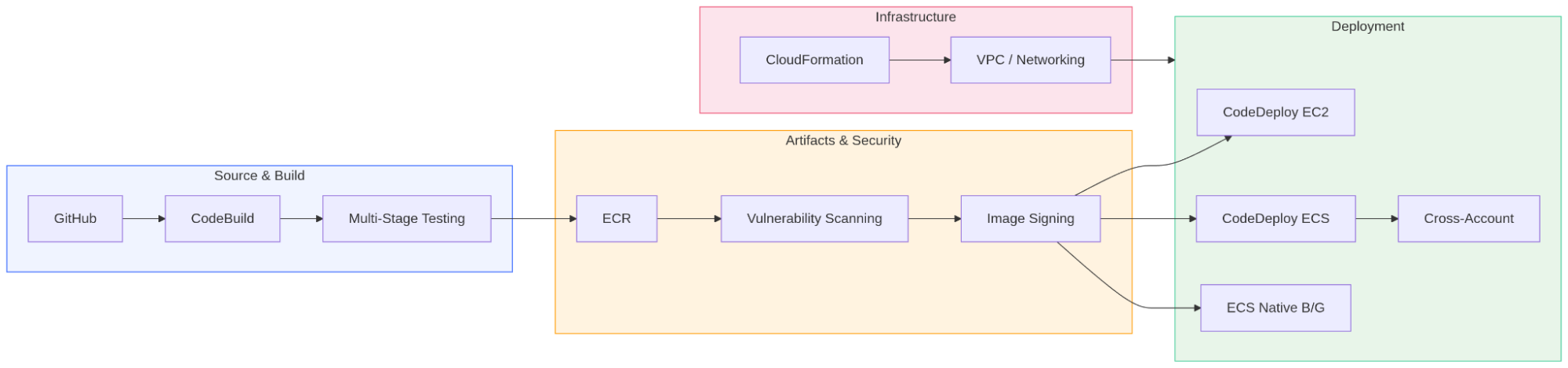
How the AWS CI/CD pipeline series fits together, from source and build through artifact security to deployment.
The posts cover the full path:
- Source and build (posts 1–2)
- Artifact security (post 3)
- Deployment strategies across EC2, ECS, and cross-account (posts 4, 5, 7)
- Networking foundation (post 6)
The series covers the mechanics. Once you move to a real environment, additional concerns come up. Here are the areas we typically focus on when taking these patterns into production.
Production Considerations
Security and Access Control
- Least-privilege IAM roles. Scope CodeBuild roles to specific ECR repositories, CodeDeploy roles to specific services, and cross-account roles to the exact actions they need.
- Secrets rotation. Rotate credentials on a schedule using Secrets Manager automatic rotation, and ensure no values leak into build logs.
- Network isolation. Run CodeBuild projects in private subnets with VPC endpoints for ECR, S3, and CloudWatch Logs. Public internet access only when explicitly required.
- Image provenance chain. Combine ECR managed signing (Post 3) with admission controllers in EKS or task-level verification in ECS so only signed images reach production.
Observability and Alerting
- Pipeline-level metrics. Track deployment frequency, lead time, change failure rate, and mean time to recovery (MTTR). CodePipeline publishes execution events to EventBridge. Use them.
- Deployment alarms. Attach CloudWatch alarms to every deployment group and ECS service. Error rate spikes, latency increases, and 5xx counts should trigger automatic rollback.
- Centralized logging. Build logs, deployment events, and scan findings should flow into a single observability platform. CloudWatch Logs with cross-account subscriptions, or a third-party tool your org already uses.
Cost Optimization
- ECR lifecycle policies at scale. With dozens of microservices pushing multiple times a day, untagged images accumulate fast. Asa result, deploy lifecycle policies across all accounts using CloudFormation StackSets, or enforce them with AWS Control Tower controls.
- Build caching. CodeBuild supports local caching and S3 caching for dependencies. A cold npm install adds 30-60 seconds per build. Multiplied across 50 builds a day, that adds up.
- Right-size Fargate tasks. Use ECS Service Connect metrics and CloudWatch Container Insights to identify over-provisioned tasks. The deployment strategies from Post 7 make it safe to roll out resource changes gradually.
Multi-Account and Governance
- Account structure. Tooling account for pipelines, shared-services account for ECR/artifacts, and separate workload accounts per environment. Post 5 covers the mechanics; a proper landing zone adds the organizational layer.
- Guardrails. Service Control Policies preventing manual deployments, Config rules enforcing tag compliance, and CloudFormation drift detection running on schedule.
- Rollback strategy. Define rollback criteria before deploying: what alarms trigger it, how long you bake, and who gets paged.
Reliability
- Multi-region deployments. Post 3 covers ECR replication. Extend this with multi-region ECS services behind Route 53 failover routing for DR.
- Pipeline resilience. If your tooling account’s region goes down, can you still deploy? Consider pipeline redundancy or at minimum, a documented manual deployment runbook.
- Canary deployments for infrastructure. Use CloudFormation change sets with manual approval for changes that affect networking or IAM, not just application code.
How AgilityFeat Can Help
The series teaches you the building blocks. From there, assembling them into a production-grade AWS CI/CD pipeline that handles 20+ microservices across multiple accounts and regions is where the real engineering effort lives.
At AgilityFeat, our nearshore engineering teams specialize in exactly this:
- CI/CD platform design and implementation. Multi-account, multi-region pipelines with proper gating, observability, and rollback. We handle the deployment topology so your team ships features, not pipeline YAML.
- Infrastructure as Code at scale. From single-stack CloudFormation to CDK constructs shared across teams. StackSets for governance, custom resources for gaps, drift detection built into the pipeline.
- Security and production hardening. Image scanning gates, signing verification, least-privilege IAM, compliance-as-code with Config and Security Hub. Whether you’re starting fresh or stabilizing something that works in dev but isn’t production-ready, we get it there.
Our teams work in your timezone (Latin America nearshore), integrate with your existing workflows, and bring AWS expertise from day one.
What’s Next
This series focused on the CI/CD and deployment automation domain of AWS DevOps. We’re continuing to publish on Builder Center, covering:
- Advanced CloudFormation patterns (cross-stack references, nested stacks, StackSets, custom resources)
- AWS CDK for teams outgrowing raw templates
- Monitoring, observability, and incident response automation
Follow the series on AWS Builder Center for upcoming posts.
Contact AgilityFeat when you’re ready to take these AWS CI/CD patterns to production. We’ll help you get from a single pipeline to a multi-account platform.
Further Reading:
- How to Deploy a Containerized MVP on AWS ECS Fargate with Terraform and GitHub Actions
- Running Open Source LLMs on AWS: Bedrock, SageMaker, EKS, and EC2
- Spec-Driven AI Integration: Automating Complex Workflows with MCP and Agentic Tools
- Compliance Automation in AWS: Using AWS Security Hub to Streamline Security Standards
- When Does a Serverless MVP Approach Work Best?
- Deploying AI Agents in Production with AWS