
For any enterprise running applications on AWS, achieving and maintaining compliance is a constant, complex battle. In this context, compliance means continuously aligning your AWS accounts and resources with security standards and frameworks such as PCI DSS, CIS Benchmarks, NIST, or internal company policies. At AgilityFeat, our work as AWS Partners deploying secure, enterprise-grade applications means we navigate these complexities daily.
We often see teams struggling with fragmented visibility, switching between different security tools and consoles just to get a clear picture of their posture. As a result, considerable manual effort is required to connect the dots, and the lack of automated responses leaves teams perpetually in a reactive state.
In this post, we take a look at one potential solution for automated compliance: AWS Security Hub. This is an evolution from cloud security posture management (CSPM) to a unified tool comprising a collection of services that manage security and compliance requirements. We’ll walk you through what it is, how it works in a practical scenario, the business benefits, and the trade-offs you need to consider on your journey toward automated compliance.
The Challenge: Manual Compliance Checks and Fragmented Visibility
Moving from a secure architecture design to a running production environment often introduces “drift.” Configurations change, new resources are spun up, and patches are missed. The challenge isn’t usually a lack of tools—AWS provides excellent services like GuardDuty and Inspector—but rather the lack of a unified view.
Without a central nervous system for your security, your team is likely facing:
- Alert Fatigue: Drowning in low-priority notifications from multiple sources.
- Slow Mean Time to Respond (MTTR): Wasting time correlating logs manually to understand if a vulnerability is actually exploitable.
- Compliance Gaps: Failing to notice when a specific resource drifts out of compliance with standards like PCI DSS or CIS.
AWS Security Hub: A Compliance Automation Solution
AWS Security Hub integrates multiple services related to the security and compliance of your cloud resources into a single dashboard. The standout feature here is its ability to ingest and correlate findings from multiple AWS security services, giving you a true “single pane of glass.”
Understanding Security Standards and Controls
Before diving into how Security Hub automates compliance, it’s important to understand how it works. In AWS Security Hub CSPM, a security standard is a set of requirements based on regulatory frameworks (like PCI DSS or HIPAA), industry best practices (like CIS Benchmarks), or company policies.
Security Hub CSPM currently supports standards like AWS Foundational Security Best Practices, AWS Resource Tagging, CIS AWS Foundations Benchmark, NIST SP 800‑53, NIST SP 800‑171, PCI DSS, and service‑managed standards such as AWS Control Tower.
Security Hub maps these requirements to controls: specific, testable security checks. For example, a PCI DSS requirement might map to a control that checks whether S3 buckets have encryption enabled. Security Hub then runs automated security checks on these controls to assess whether your environment meets the standard’s requirements. Each standard includes multiple controls, giving you granular visibility into your compliance posture.
This structure means compliance automation isn’t just checking boxes. It’s continuously validating that your AWS resources meet specific, measurable security requirements.
How Automated Compliance Works: Integration and Correlation
Security Hub doesn’t work in a vacuum. It derives its power from integrating and making sense of data from several key “detection engines”:
- AWS Security Hub CSPM: The foundation, performing security checks based on common compliance standards like CIS, PCI DSS, and the AWS Foundational Security Best Practices.
- Amazon GuardDuty: A threat detection service that continuously monitors for malicious activity and anomalous behavior.
- Amazon Inspector: Your automated vulnerability scanner for EC2 instances, ECR container images, and Lambda functions.
- Amazon Macie: A data security service that uses machine learning to discover and protect sensitive data stored in Amazon S3.
Instead of just listing alerts from these services, Security Hub intelligently correlates these individual signals to create “Exposure findings.” This provides crucial context. For example, Security Hub can automatically detect when a publicly exposed resource with a critical vulnerability also has access to sensitive data, allowing you to prioritize that issue above all others. It accompanies this with a diagram that depicts the involved AWS services and the potential attack path.
To ensure all this data speaks the same language, it uses the Open Cybersecurity Schema Framework (OCSF) for standardization.
Practical Scenario: Compliance Automation from Detection to Resolution in Minutes
Imagine a simple situation: your company runs a vital application that handles customer information. Unknown to the development team, the EC2 instance hosting this application has several vulnerabilities. These, combined with existing misconfigurations, could potentially grant unauthenticated access to sensitive data.
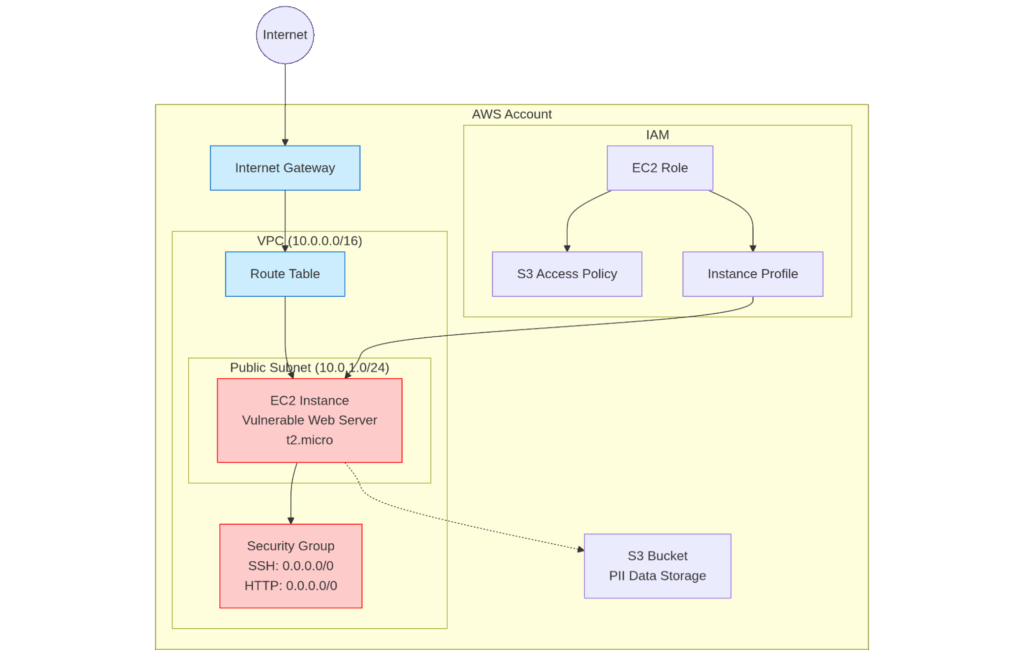
Automated Compliance in AWS Security Hub Attack Path Diagram
Step 1: Gaining Unified Visibility
You log into the AWS Security Hub console. Instead of reviewing through multiple dashboards, you see a single, prioritized list of findings. For instance, you can see potential threats regarding the vulnerable server reachability next to a critical “Exposure summary” finding regarding credential stealing due to such a server having vulnerabilities.
The dashboard also includes data from individual resources and shows security coverage from related AWS services.
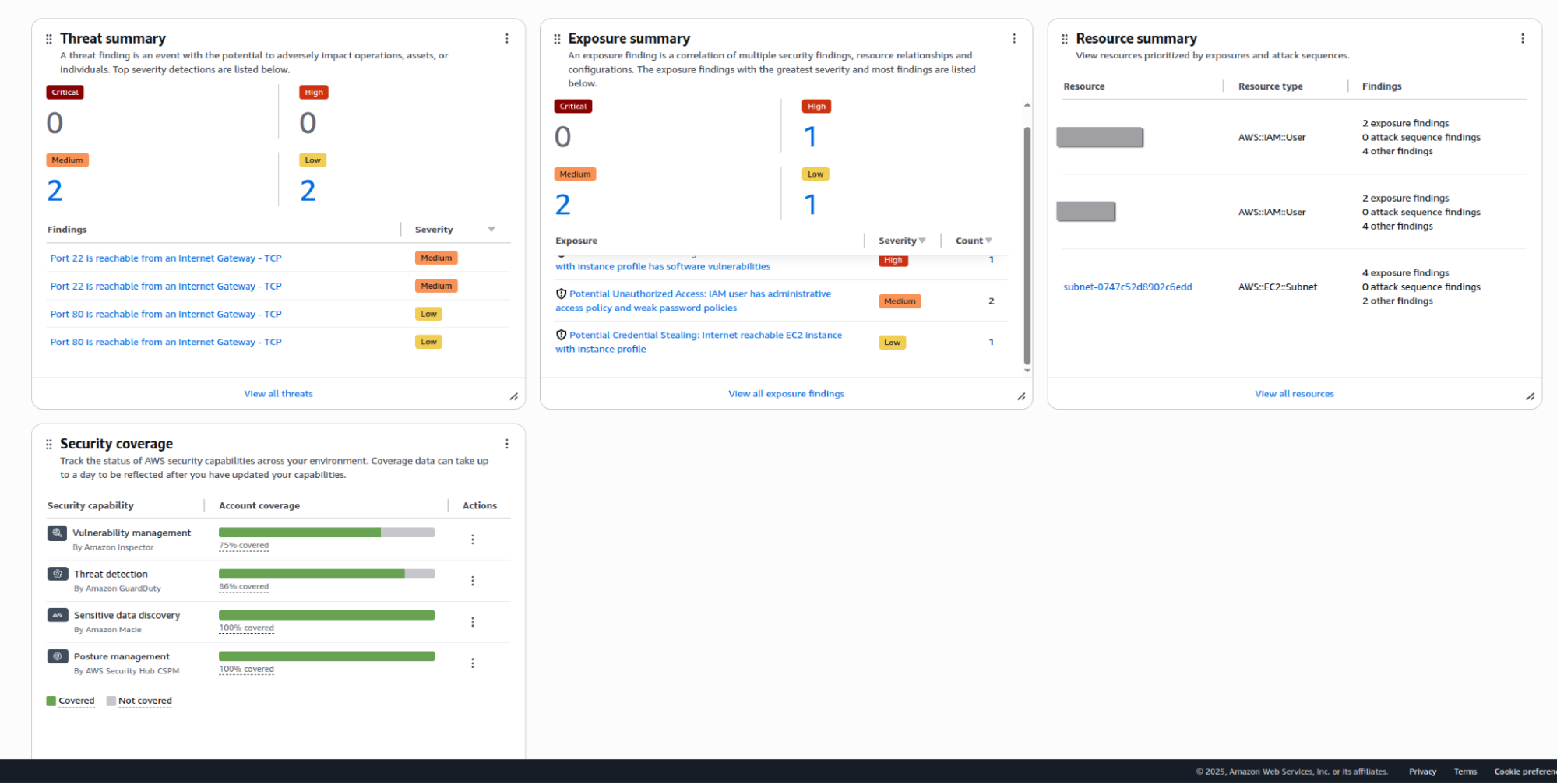
Summary dashboard of issues identified by Security Hub.
Step 2: Understanding the Full Context with Attack Path Visualization
You click on the critical finding. In addition to showing a vulnerability, Security Hub shows you why it matters. You can see a quick explanation of the issue, the involved resources, and also the traits that contribute to the issue becoming a weakness.
The tool also presents this as a visual attack path showing exactly how an attacker could exploit the public-facing vulnerability to pivot and potentially take control of the vulnerable resource. What were once individual low-priority alerts are now a single, high-context, critical security risk.
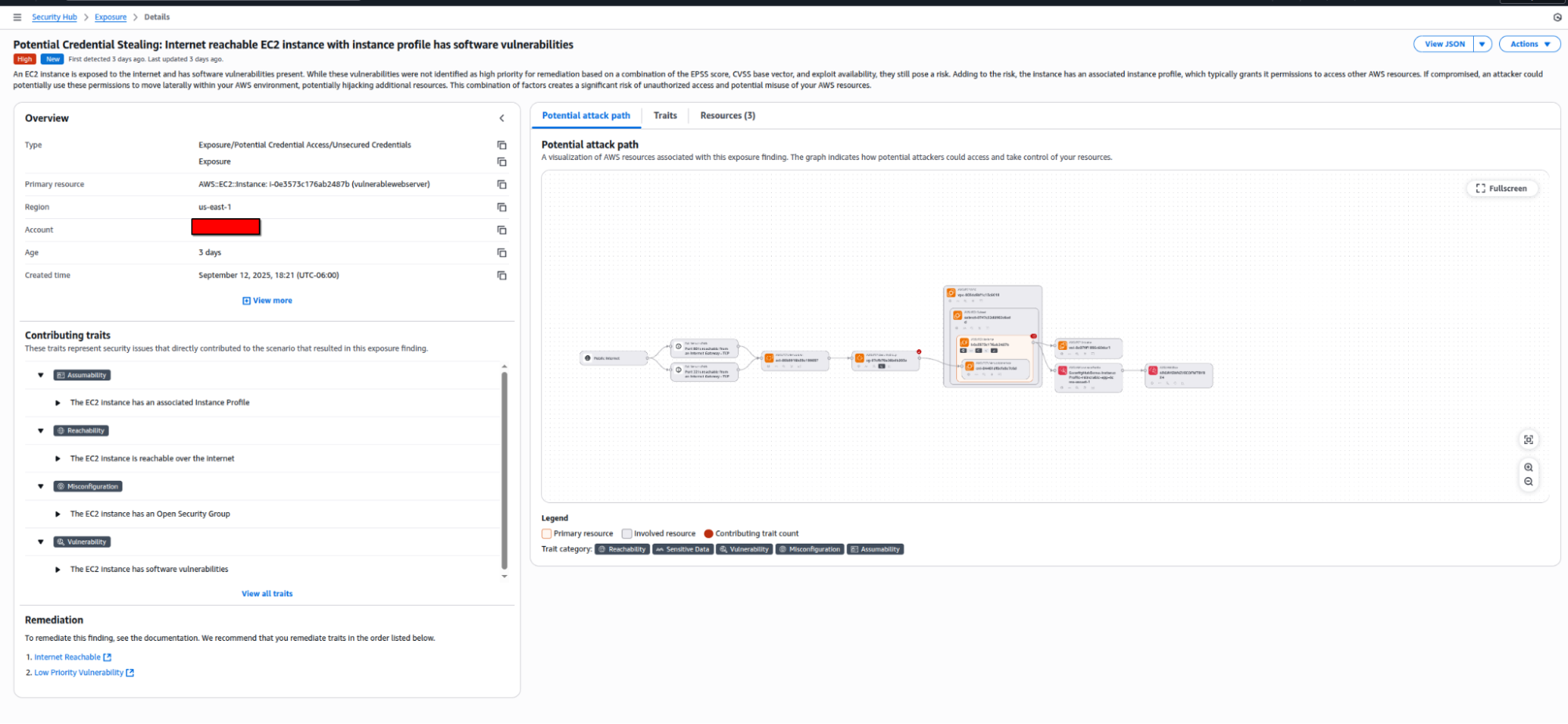
Automated Compliance in AWS Security Hub Showing EC2 Credential Exposure
Step 3: Taking Decisive Action
Now that you understand the full scope of the risk, you can act immediately.
- Manual Action: Directly from the finding details in the AWS console, you use the “Actions” dropdown to take appropriate measures. For instance, Security Hub supports integration with Jira Service Management Cloud. This automatically populates a high-priority ticket in your development team’s backlog with all the relevant details, including a link back to the finding. This ensures the right people are notified instantly to begin patching the vulnerability.
- Automated Response: You can also integrate with Amazon EventBridge, so that any finding with a “CRITICAL” severity automatically triggers a Lambda function. This function can take immediate containment actions, such as isolating the compromised EC2 instance by placing it in a quarantine security group, while simultaneously creating the Jira ticket.
Business Benefits of Compliance Automation with AWS Security Hub
Implementing Security Hub goes beyond technical improvements to deliver real business value:
- Drastically Reduced MTTR: By automating the correlation of findings, your team spends less time investigating “false positives” and more time fixing real threats.
- Continuous Compliance: Instead of scrambling before an audit, you have a real-time view of your compliance score against standards like PCI DSS or CIS.
- Operational Efficiency: Centralizing alerts means your security team doesn’t need to be experts in every single AWS service console—they just need to master the Hub.
Considerations and Trade-offs for Compliance Automation
While Security Hub is a powerful tool, enabling it is just the first step. There are considerations to keep in mind:
- Cost Management: Security Hub uses a consolidated per-resource pricing model (the “Essentials plan”) for its base features, and Add-on capabilities that are billed separately based on usage volume.
- Remediation is Still Your Job: Security Hub is excellent at finding problems, but unless you configure auto-remediation (via EventBridge and Lambda), a human still needs to decide how to fix the issue.
Your Path to Compliance Automation
AWS Security Hub is a significant step forward for any organization looking to mature its cloud security posture. By offering a unified view, powerful correlation of findings, and robust automation capabilities, it helps turn the chaotic, reactive process of security management into a proactive, automated compliance strategy.
Exploring a new service and redesigning workflows can be a significant undertaking. If your organization is looking to automate compliance and wants to see how services like AWS Security Hub can fit into your strategy, work with the experts at AgilityFeat. We can help you navigate through the intricacies of compliance for cloud resources.

Further Reading:
- When Does a Serverless MVP Approach Work Best?
- Building Scalable DevOps Infrastructure: Why Growing Teams Need Specialized Expertise
- Scaling A Remote Team Into An Enterprise Organization Without Losing Its Agile DNA
- From Frustration to Transformation: Why Enterprise Leaders Should Partner with AgilityFeat